VSCode remote connection setup & common issues

Connect to server

The official connection tutorial is too long; here is a short video version https://youtu.be/7kum46SFIaY?t=59

Text version of the above tutorial:

  1. Go to the extensions store, search for remote, and install that extension

  2. In the terminal of your VM, enter sudo apt install openssh-server

  3. Choose SSH connection image

  4. Click this + sign and enterssh username@ip-addressWhat are the username and address? Check your server provider's remote connection tutorial; it's there. image
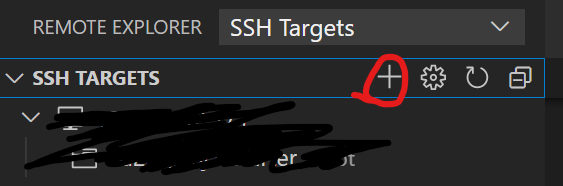
Connect to local VM

Same as above, the only difference is you need to enter the following in the VM's command lineip addrto get that VM's IP address.

Passwordless login

  1. Generate an ssh key locally

ssh-keygen -t rsa -C "your email"

The generated ssh public key file is in the .ssh folder as id_rsa.pub

  1. Generate ssh key on Linux

  2. In Linux, inside the .ssh folder create a file called authorized_keys, then paste the contents of id_rsa.pub from the same directory into it

After completing the above steps you should be able to log in without a password. If not, run the following additional step:

In VSCode, press Ctrl+Shift+P, type Remote-SSH: Open SSH Configuration File, pick one of the paths, such as C:\Users\LENOVO\.ssh\config, and add a line IdentityFile ~/.ssh/id_rsa, like this:

Cannot connect after reinstalling server

Problem description: First time connecting with VS Code succeeded. Later the server/VM was reinstalled for other reasons. Following the above steps the connection failed in VS Code, but Putty could connect.

Solution: The error shows a path like C:\Users\LENOVO\.ssh. Go to that path

  1. Open known_hosts with Notepad or VS Code and delete the line that contains the IP of the VM you reinstalled

  2. Open the config in the same directory and delete the three lines that contain the IP of the VM you reinstalled.

  3. Problem solved; connect using the original method.

Environment variables require restarting VSCode to take effect

I connected to the server with VSCode and edited .bashrc to modify environment variables. echo shows the changes succeeded, but the app couldn't read the environment variables. After closing VSCode and reconnecting to the server, the app could read the environment variables.

Other ssh clients can't see the Go environment

I normally use VSCode; a colleague used Royal TSX on MacOS to connect to the server and found the Go environment was missing, but when using my VSCode there was no problem

Last updated
